
For years the honest answer to “how long until Google picks this up?” has been “it depends”. That’s true, but it isn’t much use to a business owner waiting on a new service page, or to an agency explaining to a client why a title change hasn’t shown up yet.
In early October 2026, Google finally put numbers on it. Gary Illyes shared typical and slowest timings for crawling, indexing and serving at Search Central Live in Barcelona. Here’s what those numbers say, where the word “never” keeps showing up, and how I’d use them to set expectations with a team or a client.
Where these numbers come from
The figures come from slides Gary Illyes presented at the Google Search Central Live Deep Dive event in Barcelona. According to Search Engine Land, it’s the first time Google has shown this kind of information at an event. Illyes described it as an exercise to see whether the audience could relate to numbers Google had pulled internally.
Each process gets two numbers: a typical time and a slowest time. Typical is what usually happens. Slowest is the tail, and that’s where most of the frustrating client conversations live.
One caveat before we go further. These are conference slides reported by Search Engine Roundtable and Search Engine Land, not a published Google help document. They’re the best numbers we’ve had, but treat them as ranges, not service-level agreements. Many of these processes also depend on each other, so delays can stack.
Crawling: new URLs in about 20 hours, known URLs about every 30 days
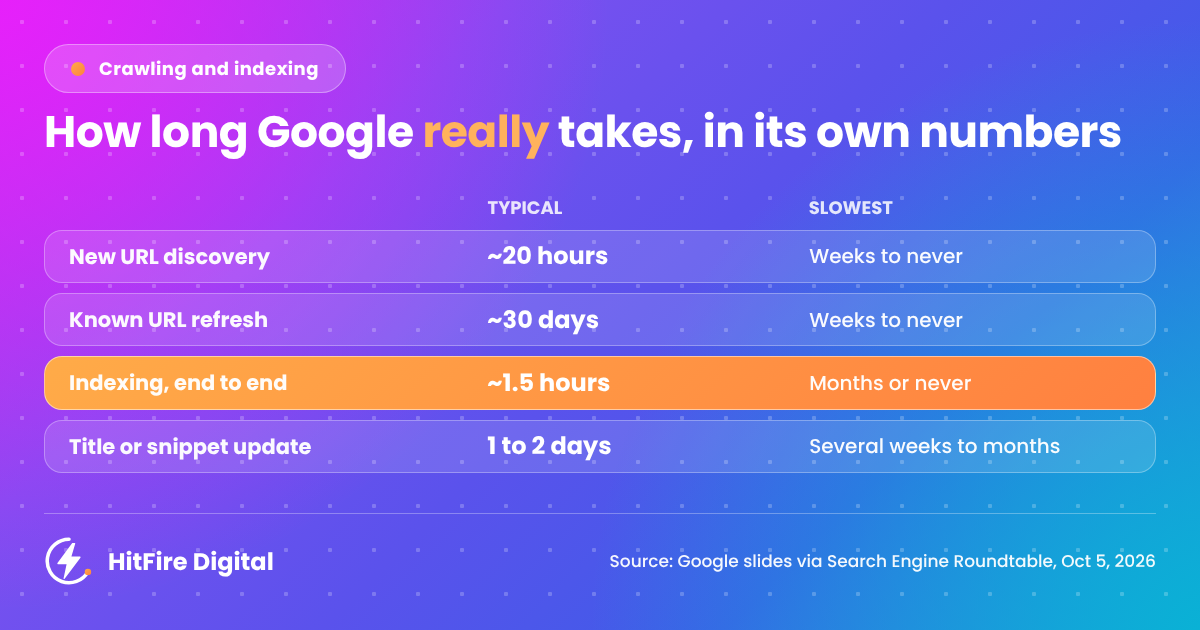
Google typically discovers a new URL in around 20 hours. Once it knows a URL, it typically refreshes it around every 30 days. The slowest case for both is “weeks to never”.
That 30-day refresh figure matters more than people think. If you update an existing page and expect Google to notice tomorrow, you’re probably going to be disappointed. Strong internal links from pages Google already crawls often help a lot more than waiting.
The other crawling numbers worth knowing:
- Sitemap processing: typically around 24 hours, slowest up to 14 days, “or never (quality)”.
- robots.txt updates: typically around 24 hours, slowest 25 hours. This is the most predictable thing on the whole slide.
- Crawl capacity: typically 4 hours to 1 to 2 weeks to adjust, slowest 1 to 3 weeks when recovering. It can also drop in seconds, which is why server errors during a launch are so costly.
- Crawl demand: typically around 20 hours, slowest weeks to months.
Notice the sitemap line. A sitemap gets processed, but Google can still decide the URLs in it aren’t worth crawling. Submitting it again doesn’t change that.
Indexing: about 1.5 hours end to end, unless quality gets in the way
This is the number most people won’t expect. Once Google has crawled a page, typical end-to-end indexing takes around 1.5 hours. The slowest case is “months or never (quality)”.
So indexing itself is fast. When a page sits in “Crawled, currently not indexed” for weeks, the bottleneck usually isn’t Google’s pipeline. Google has looked at the page and decided it isn’t worth keeping.
The rest of the indexing slide:
- Rendering: seconds to render, but hours waiting in the queue. Slowest: days to weeks. If your key content only appears after JavaScript runs, you’re adding that queue to every change.
- Meta annotations: typically 45 to 90 minutes, slowest 1 to 4 days.
- Link annotations: minutes to 1 to 3 weeks, slowest months. New internal links don’t pass their full value overnight.
- Canonicalisation changes: typically 1 to 3 weeks, slowest months when signals conflict.
- Structured data updates: hours to 1 to 2 weeks, slowest “weeks or never (quality)”.
- Images and videos: hours to days, slowest weeks to months.
- Removals: typically 1 to 3 weeks, slowest months.
The canonical line is worth showing to developers. If your canonical tags, internal links, sitemaps and redirects disagree, you aren’t just confusing Google. You’re choosing the slow path.
Serving: titles in 1 to 2 days, site moves in 1 to 3 months
Serving is what people actually see in the results, and it’s where expectations go wrong most often.
- Title and snippet updates: typically 1 to 2 days, slowest several weeks to months.
- Text result image updates: typically 1 to 2 weeks, slowest several weeks to months.
- Removals through Search Console (by the site owner): typically around 2 hours, slowest 24 hours.
- Site moves: typically 1 to 3 months, slowest 6 months to over a year. A small move can be done in a few weeks.
Then there are the algorithm and penalty timings, which matter if you’re diagnosing a drop:
- Spam updates: roll out in 1 to 2 days, according to the slide. (The September 2026 spam update took almost 14.)
- Core updates: take 2 to 4 weeks to roll out. Recovery after a core update change is typically 3 to 6 months, and the slowest case is 6 months to a year, meaning the next core update.
- Manual action removal: typically 1 to 2 weeks, slowest 4 to 6 weeks, or much longer for dormant sites.
If you’re planning a migration, put that 1 to 3 month figure in the project plan from day one. It’s a much easier conversation before launch than after it.
The “or never” problem: quality decides the slow cases
The typical numbers aren’t the story. The word “never” is.
It shows up next to new URL discovery, known URL refresh, sitemap processing, indexing and structured data. In three of those places, Google’s slide explicitly puts “(quality)” next to it.
Here’s the thing. If indexing typically takes around 1.5 hours and a page still isn’t indexed after a month, the problem is almost never speed. It’s that Google doesn’t think the page adds enough. That changes what you should do about it:
- Stop resubmitting. Requesting indexing or resubmitting the sitemap again won’t fix a quality decision.
- Check the page against what already ranks. Is it saying anything the top results don’t? Thin location pages and near-duplicate service pages are the usual suspects.
- Check the site, not just the page. If a large share of your URLs sit unindexed, Google may be making a site-level judgement about what’s worth crawling.
- Consolidate before you create. Merging three weak pages into one strong one often does more than publishing a fourth.
- Then fix the technical basics. Clean canonicals, internal links from pages that already rank, and content that doesn’t depend on JavaScript to appear.
The same logic carries into AI search. Content that never makes it into Google’s index has no chance of being used in AI Overviews or AI Mode answers either.
A timing cheat sheet for client expectations
This is the version I’d keep handy for client calls. Quote the typical figure, and warn them about the slowest one before they ask.
| The question you get asked | Typical | Slowest |
|---|---|---|
| “When will Google find our new page?” | ~20 hours | Weeks to never |
| “When will Google see the update to our page?” | ~30 days (refresh) | Weeks to never |
| “How long until it’s indexed?” | ~1.5 hours once crawled | Months or never (quality) |
| “We submitted the sitemap, so why nothing yet?” | ~24 hours | Up to 14 days, or never (quality) |
| “Why hasn’t our new title shown up?” | 1 to 2 days | Several weeks to months |
| “When will our schema show in results?” | Hours to 1 to 2 weeks | Weeks or never (quality) |
| “We changed the canonical, when does it take?” | 1 to 3 weeks | Months (conflicting signals) |
| “How long will the site migration take to settle?” | 1 to 3 months | 6 months to 1 year+ |
| “When do we recover from the core update?” | 3 to 6 months | 6 months to 1 year (next core update) |
| “How long to lift a manual action?” | 1 to 2 weeks | 4 to 6 weeks, longer for dormant sites |
Source: Google’s slides from Search Central Live Barcelona, as reported by Search Engine Roundtable.
The short version
Google is faster than most people assume at the mechanical steps, and slower than most people assume at the judgement calls. A page can be indexed in about an hour and a half. It can also never be indexed at all, and no sitemap ping will change that.
So when something is “stuck”, ask the right question first. Is it waiting in a queue, or has Google already decided? The first needs patience. The second needs a better page.
Have pages that have been stuck for weeks? Get in touch for an indexing check, and I’ll tell you whether you’re looking at a technical problem or a quality one.